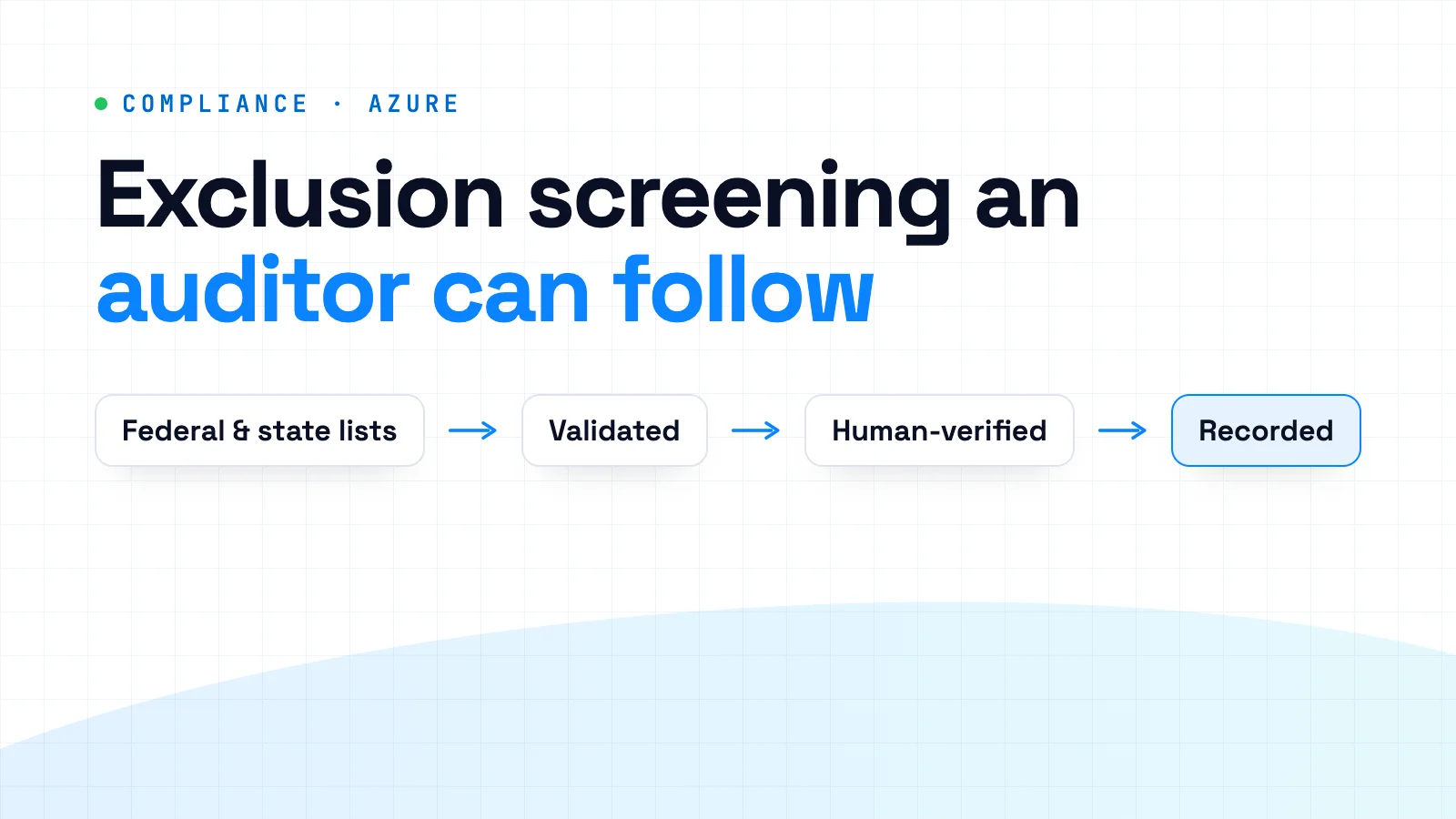
Many exclusion screening programs start the same way: once a month, someone downloads the federal exclusion list, opens the roster in a spreadsheet, and searches names one at a time. It looks fine until something slips, and nothing flags the slip: the month the download broke, the contractor who never made the roster, or the auditor's question nobody can answer. Which version of which list did you check this person against, and who decided the match was a different person?
We recently built an exclusion screening application for a client, covering both the front end and the back end, and designed the Azure architecture behind it. It has not launched yet; it is in its last round of testing, so this is not a results story. Here is what we learned designing it, and a checklist you can use whether you build, buy, or keep screening by hand.
Monthly OIG exclusion screening: obligation, stakes, and scope
Start with the obligation, stated carefully, because it is often overstated. In its 2013 Special Advisory Bulletin, the HHS Office of Inspector General (OIG) said providers are not required by statute or regulation to check its List of Excluded Individuals/Entities (LEIE). Because OIG updates the LEIE monthly, though, it said monthly screening best minimizes potential overpayment and penalty liability. Federal regulations require state Medicaid agencies to check the LEIE and the System for Award Management (SAM.gov, formerly EPLS) at least monthly, and guidance from the Centers for Medicare & Medicaid Services (CMS) says states should require providers to search the OIG list monthly. Many providers inherit a monthly duty that way, through state enrollment terms and contracts.
No Federal health care program payment is made for items or services an excluded person furnishes, orders, or prescribes. CMS guidance says the Medicaid ban also reaches an excluded individual's Medicaid-funded salary and benefits, even if that person gives no direct patient care. And OIG can impose civil money penalties on an organization that employs or contracts with a person the organization knew, or should have known, was excluded.
Screening draws on three kinds of list:
- ✓The LEIE, OIG's list of currently excluded individuals and entities, updated monthly. OIG recommends it as the primary source for its own exclusions.
- ✓SAM.gov exclusion records from various federal agencies. SAM includes OIG's exclusions with less detail, such as no date of birth, so it does not replace the LEIE.
- ✓State Medicaid exclusion or termination lists. The LEIE does not include them, and CMS has told states that keep their own list to remind providers to search it whenever they search the LEIE.
The roster is wider than most people expect, too: OIG's guidance covers everyone whose services are payable by a Federal health care program, including staffing-agency nurses and billing or coding contractors. If you rely on a contractor's own screening, OIG recommends you validate it, for example by asking for their screening documentation.
Where manual exclusion checks break down
The search itself is rarely the problem. The trouble is everything around it:
- ✓Volume. OIG's online search checks up to five names at a time: twenty searches for every hundred people on the roster, every month.
- ✓Broken downloads. A download that stops halfway, or an error page saved with a .csv name, produces fewer rows. Fewer rows look exactly like fewer exclusions, so anyone in the missing rows screens clean.
- ✓Name matches treated as findings. OIG says a matching first and last name is not sufficient. Without structured review, common names get over-flagged until people stop looking.
- ✓Roster gaps. Contractors and vendors often sit outside the HR system, so they never make it onto the roster being screened.
- ✓Skipped state lists. The state list is often the step that drops off when the person who knew about it leaves.
- ✓Evidence in inboxes. When the auditor asks about March, the answer is a folder of PDFs and someone's memory of why a match was cleared.
Design exclusion screening around the auditor's questions
The most useful decision in our design was to treat screening as a record, not a search. Every run should answer four questions on its own:
- ✓Which list versions did you check, and when were they retrieved?
- ✓Which roster did you screen, and as of what date?
- ✓Which potential matches came up, and who reviewed each one?
- ✓Why was each match cleared or escalated, and what happened next?
Which list versions did you check? Validating LEIE, SAM.gov, and state downloads
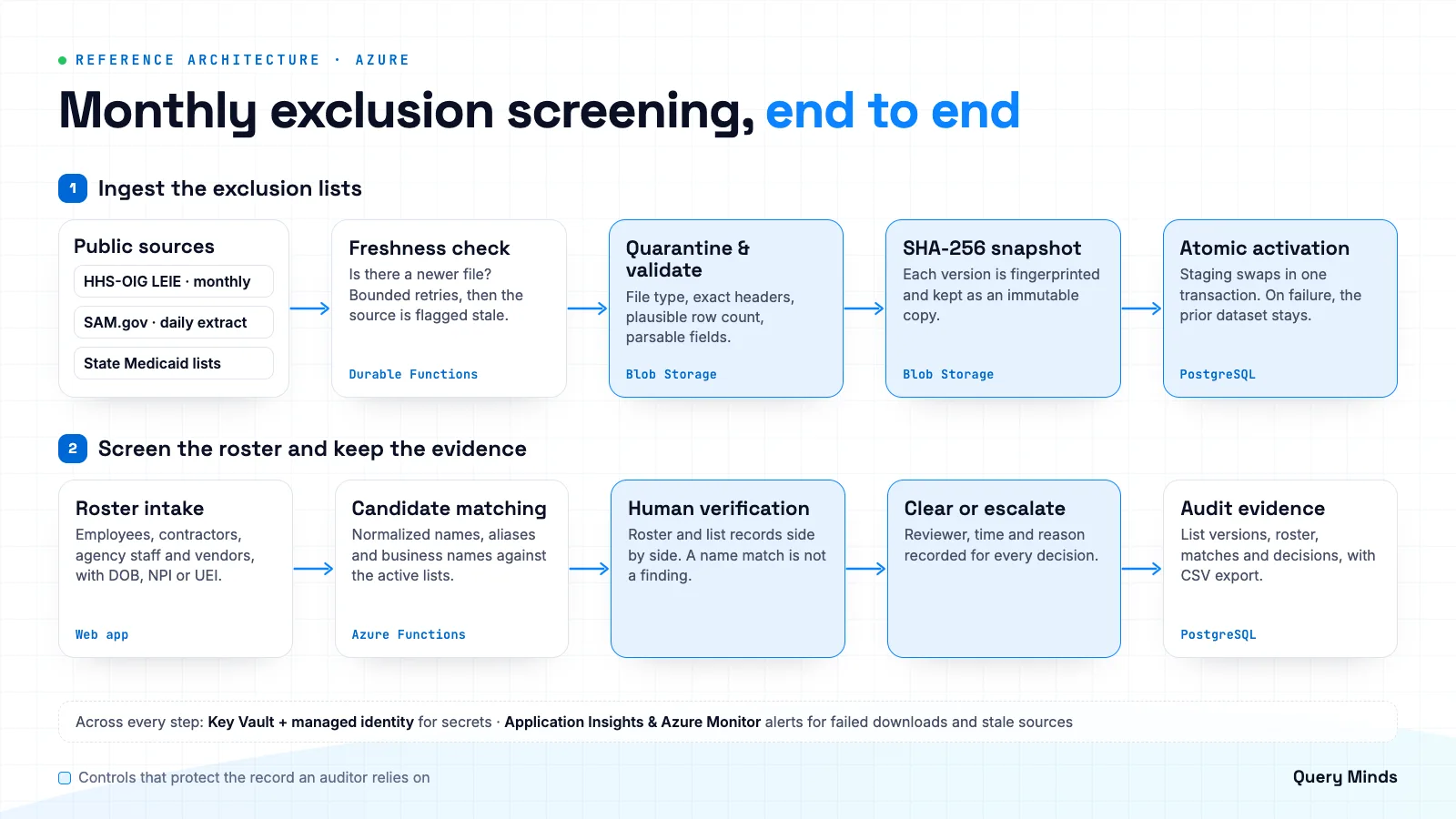
This is the data-collection problem: getting a complete, current copy of every list before anything is screened. OIG publishes the full LEIE as a single CSV file of every exclusion in effect, replaced each month with reinstated individuals and entities removed. It also publishes monthly supplement files of new exclusions and reinstatements, and advises using either the full file or the supplements, but not both. SAM.gov produces a daily public exclusions extract, a zipped CSV downloaded through GSA's Extracts API with a required API key. State lists are separate sources you have to collect individually, so each state you bill Medicaid in that keeps its own list adds another source to collect, validate, and track.
The data-collection process we designed treats every downloaded file as untrusted until it passes its checks. Each source gets a freshness check, and retries are bounded: a download that keeps failing should mark the source as stale and raise an alert instead of carrying on with an older file as if it were current. Every file that does arrive lands in quarantine first. Validation does not need to be elaborate. Checks worth having:
- ✓The file is a real CSV or ZIP rather than an HTML error page saved under the expected name.
- ✓The header row matches the expected columns exactly. An added, dropped, renamed, or reordered column should stop the import before values land in the wrong fields or go missing.
- ✓The row count is plausible against the last valid version. A list that shrinks sharply from one version to the next is more likely a truncated download than a wave of reinstatements.
- ✓Required fields parse: dates are dates, and identifiers have the right shape where present.
A file that fails stays in quarantine for a person to inspect. A file that passes gets a SHA-256 hash, which detects an unchanged download and gives each version a fingerprint the audit record can cite. "Checked, unchanged" is evidence; no record at all is a gap. Every accepted file is also kept as an immutable snapshot, so a past run can be traced to the exact data it used. How long to keep snapshots is for your compliance and legal teams to decide.
Accepted files load into staging tables next to the live dataset and are activated in a single database transaction, an all-or-nothing swap. If anything fails, the transaction rolls back and the prior valid dataset stays active. A half-loaded exclusion list is worse than a stale one: a stale list can be flagged as out of date, while a half-loaded one returns clean results that are wrong. The goal of freshness monitoring is that every source is either current or clearly flagged as stale.
Which roster did you screen? Staff, contractors, and vendors
In the application we built, roster intake is its own step: it is designed so the current staff, contractor, and vendor roster is uploaded before screening, and each run records what it screened. A monthly overview shows where the current cycle stands, run history lists every past run, and a source freshness view shows how current each list is. Whether a contractor was screened in a given month should be a lookup, not an investigation.
At intake, capture the identifiers the public lists actually carry: date of birth and National Provider Identifier (NPI) for individuals, and legal business name, NPI, and Unique Entity ID for vendors. The LEIE download includes name, address and, where OIG has them, date of birth and NPI; the NPI field is all zeros where OIG has none, which is common for entities. SAM's extract adds Unique Entity ID and aliases but has no date of birth or taxpayer number. The more of these your roster holds, the faster a reviewer can rule a candidate in or out.
Who cleared each potential match? Identity verification and escalation
Here the design is deliberately conservative: a name match is a candidate, not a finding. Good matching normalizes names (case, punctuation, suffixes, hyphenated surnames), checks business names and SAM aliases, and ranks candidates with whatever corroborating data exists. Lean toward surfacing candidates: a missed match is a compliance problem, while an extra one costs a reviewer one more check.
Every potential match goes to a person for identity verification, on a review screen that puts the roster record and the list record side by side. Neither public download carries Social Security numbers (SSNs) or Employer Identification Numbers (EINs); for the LEIE, the Privacy Act prohibits disclosing SSNs. When the available fields cannot settle an LEIE match, OIG's online search lets you select Verify and enter an SSN or EIN to confirm identity. A good workflow leaves room for that step and records it.
Each decision is recorded with the reviewer, the time, and the reason. A match that cannot be cleared becomes an exception, escalated to whoever owns exclusion decisions. The software's job ends at a well-documented escalation; what happens after a confirmed match belongs to your compliance and legal teams. Audit history keeps every run and every decision, and CSV export hands that evidence to an auditor without screenshots. The application includes a users and roles view, and role-based access is part of the design.
Because review is careful work, the application also includes responsive layouts, visible keyboard focus styles, reduced-motion handling, and live status announcements for screen readers.
The Azure architecture we designed for automated screening
For IT leads, the architecture uses standard Azure building blocks:
- ✓Azure Functions and Durable Functions orchestrations in TypeScript on Node.js for list collection and screening runs. Orchestrations checkpoint their progress and support retry policies with maximum attempts and backoff.
- ✓Azure Blob Storage for downloaded source files and their immutable snapshots.
- ✓Azure Key Vault with managed identity for secrets such as API keys, so credentials stay out of code and configuration files.
- ✓PostgreSQL with Prisma for screening data and audit history, including the single transaction that swaps in a new list version.
- ✓Application Insights and Azure Monitor, so failed downloads, overdue sources, and stalled runs can raise alerts.
Checklist: evaluating exclusion screening software or a custom build
Ask these questions of any option, including the spreadsheet you use today:
- ✓Does it cover the LEIE, SAM.gov exclusions, and every state Medicaid list that applies to you, and show each source's last successful update?
- ✓When a download fails or a file looks wrong, does screening stop, warn, or carry on with an old file? Does the last good version stay in use until a new one passes its checks?
- ✓Does the roster include employees, contractors, staffing-agency personnel, and vendors, screened before hire or contract and monthly after that?
- ✓Does a person verify identity for every potential match, with the reason recorded, and is there an escalation path for matches that cannot be cleared?
- ✓Can you produce, for any past month, the lists checked, the roster screened, the matches found, and the decisions made, without rebuilding it by hand?
Requirements vary by state and by contract, so check with your compliance counsel or state Medicaid agency which lists you must screen, how often, and what to do with a confirmed match. What does not vary is the shape of a process you can explain: treat each list as untrusted until it passes its checks, never let a broken file replace a good one, send every name match to a person, and write down every answer.